Bringing AI into an investment platform
AI features for an investment platform in private capital markets: meeting recaps that create tasks, a chat, report templates and AI inside the screens where people work. I designed each one, and the design system behind them, from 2023, when AI was not on the roadmap, to 2026.
- Role
- Senior Product Designer, with 3 PMs
- For
- Institutional allocators and fund managers
- What I did
- Meeting recaps
- Chat
- Report templates
- AI in the screens
- Design system
- Meeting and templates
- Output, report and matrix
- Research
- Edit and consult
01
The platform and the problem
The platform is where institutional investors manage private-market investments. Allocators and fund managers use it for diligence on funds, tracking the managers they invest with, and preparing investment committees.
More than 1,900 LPs and 2,200 GPs use it today, up from about 400 allocators in 2023.
The problem: the information behind each decision is spread across meetings, documents and reports, and people move it by hand. Investment teams spend about 30% of their time moving data, and up to 22 hours a week on due diligence and manager calls (Mercer and Backstop, 2020). Their decisions move real money, so every answer has to show where it came from.
For three years I worked on one question: how to get that information into the platform, and into decisions, without people typing it again. When I joined in 2023, AI was not on the roadmap. I started with the base: the team's Figma files, the interface and a plan for the design system. Then AI moved to the top of the plan, and we added it in four phases, each with its own output:
- Meeting recaps. Calls become recaps and tasks, saved to the right investment.
- The chat. People ask questions across the platform's data.
- Report templates and matrices. Templates speed up report generation, and matrices compare investments side by side.
- AI inside the screens. People ask or edit where they work, without leaving the page.
The design system carried all four, and in 2026 it was rebuilt so AI tools could build from it.
The platform is under NDA, so the figures are schematic redraws with placeholder content.
02
Phase 1: meeting recaps that create tasks
Meeting recaps turn a call's transcript into a recap and tasks, saved to the right investment. We started here because meetings already produced text, and people were typing what they learned into the platform by hand.
Investors hold different kinds of meetings: a first call with a fund manager, due diligence, a reference call, a quarterly update. Each needs a different recap, so the user picks a meeting template before the call. After the call, the AI reads the transcript, writes the recap and creates the tasks. The recap stays as context for the chat and for reports.
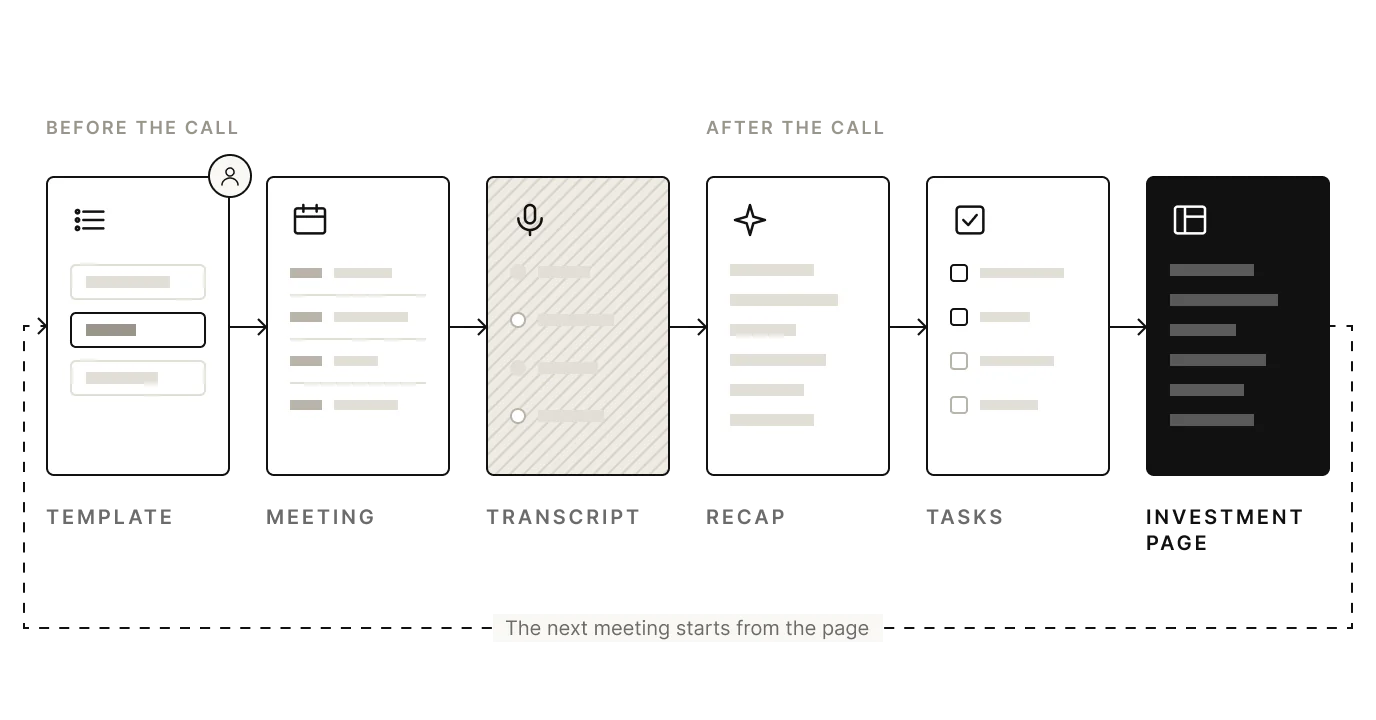
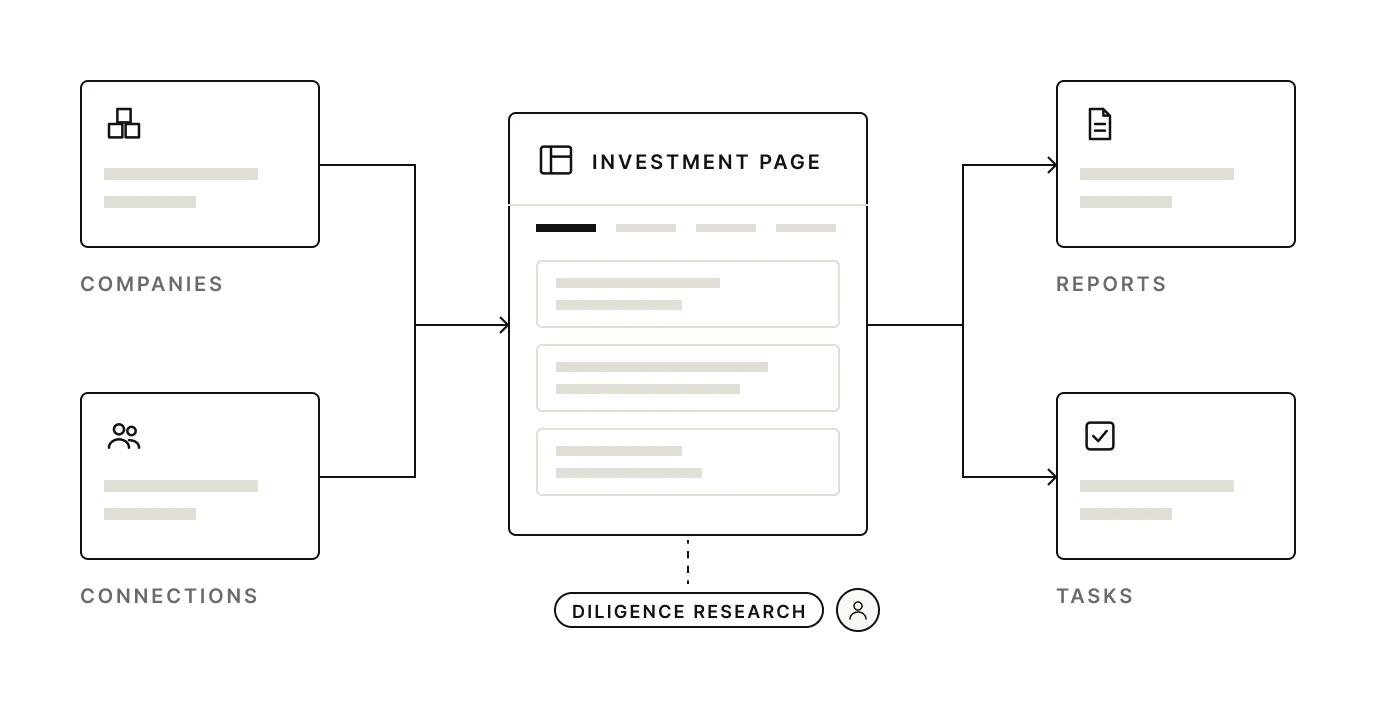
For each item to land in the right place, we defined the platform's entities, which we called connections: companies, investments, contacts, strategies (a strategy works like a project) and reports (reports and matrices). The investment page links them together. A task linked to a fund opens that fund's profile, where the user researches the fund, keeps track of it, requests information, and produces report materials and analysis.
03
Phase 2: the chat
The chat is an agent the user talks to through the composer, the box where they type to the AI. It let people ask questions across the platform's data instead of moving that data themselves. It had its own page.
04
Phase 3: report templates and matrices
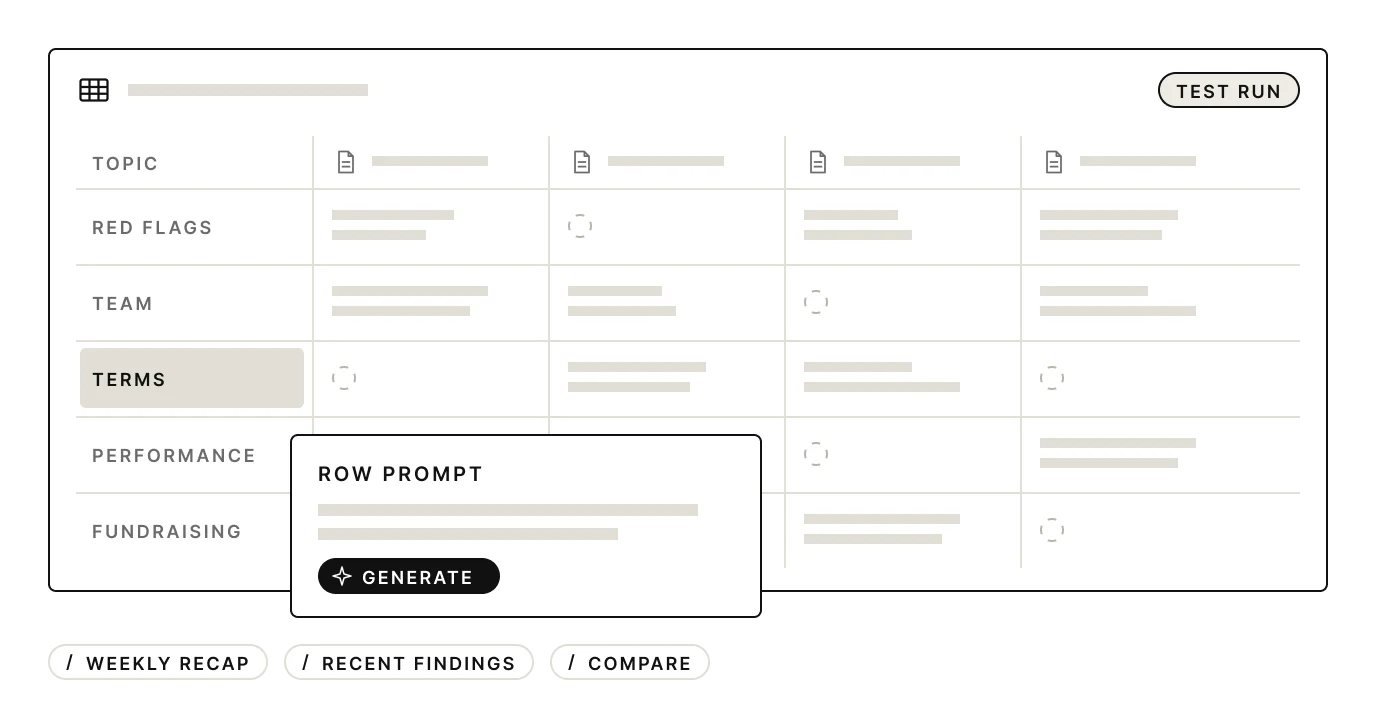
Report templates speed up how investors produce reports: the user sets a template once, and the AI fills it from the platform's data each time. Matrices are the comparison tool: one table that puts investments side by side, or tracks one over quarters. Both brought AI to people who do not write technical prompts. There were two types. A report is a document written from the platform's data. A matrix is a table with one prompt per row, for comparing investments or tracking quarterly performance.
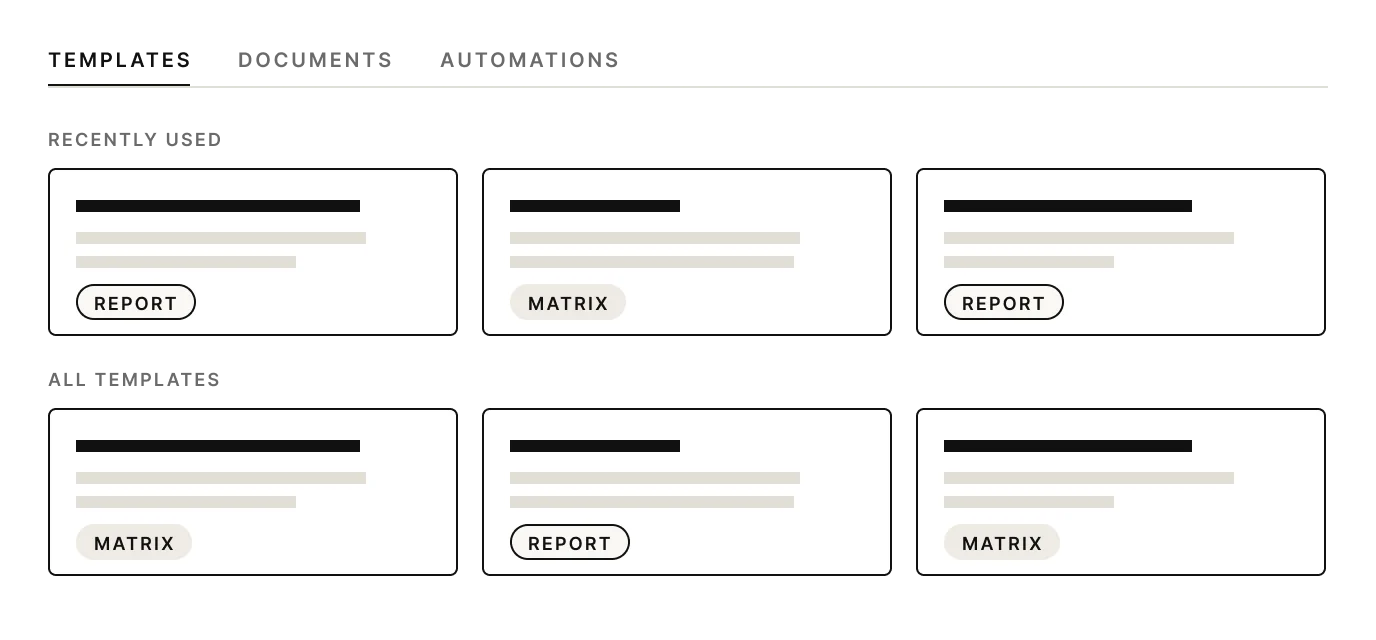
The matrix was the most useful tool and the hardest to set up: every row needs a good prompt, and most users don't write prompts. So we added:
A prompt generator
One button writes a row's prompt from the user's question.
A test page
The user runs the template on sample content before real use.
Onboarding by our team
Customer service set up each client's first templates with them.
05
Phase 4: AI inside the screens
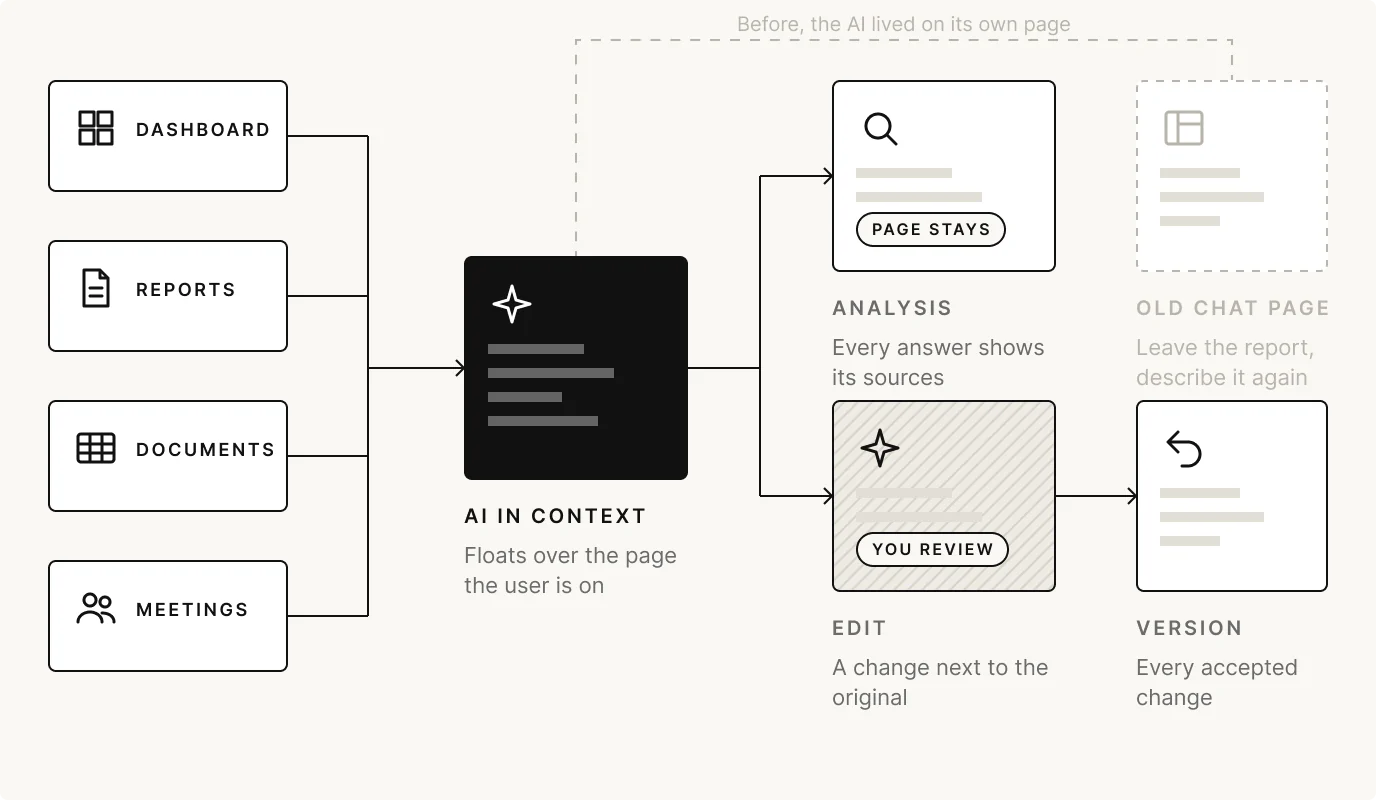
AI inside the screens lets people ask or edit where they are working, without going to the chat page. The chat showed why: people came to it at two moments, to ask about what they were reading or to change what they were writing. It treated both the same, and on its own page it made the user leave the report and describe it again.
So the AI moved into the work. It floats over the dashboard, reports, documents and meeting notes, and sits inside a report during editing. Two modes:
Analysis
The user asks, and the page does not change. Every answer shows its sources.
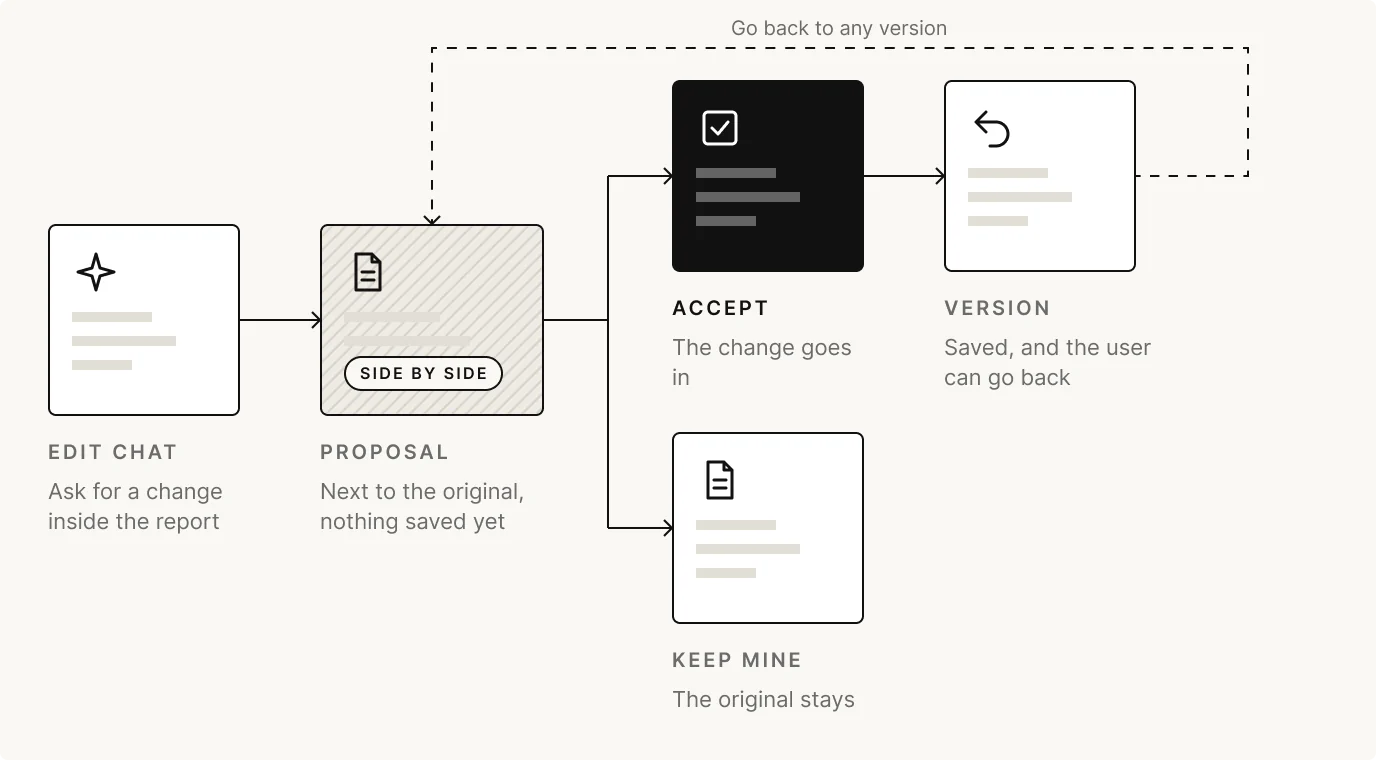
Edit
The AI proposes a change next to the original, and the user accepts it or keeps their own. Every accepted change is a version they can go back to.
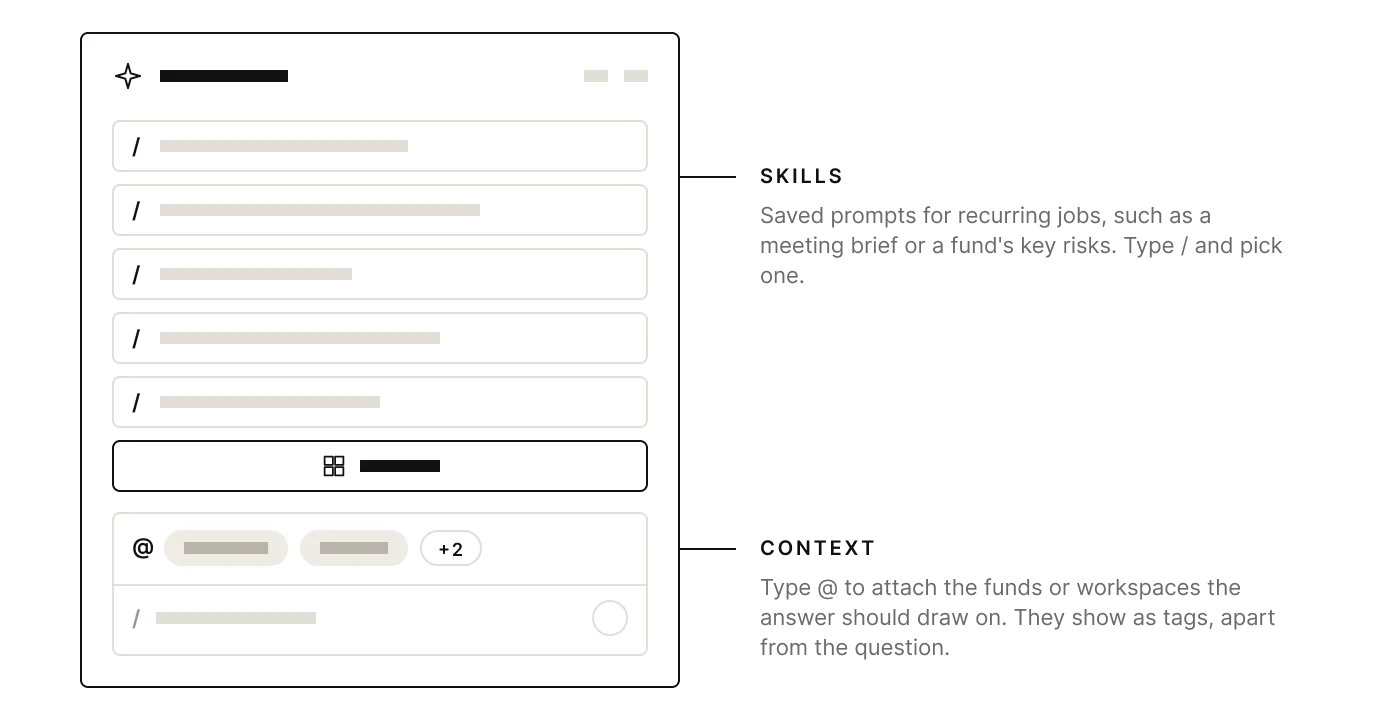
Both modes share the composer. The old one showed nine controls before anyone typed. I kept every feature and moved them behind two keys: / for commands, + for context. Attachments show as tags under the field.
06
The design system under every phase
The design system is the base each phase was built on. By 2026 the whole team, people and AI tools, was building screens. In early 2026 I rebuilt it for AI, with tokens and a contract on each component. It lived only inside Claude Code, not in the code repository: moving it there was a refactoring job that hadn't been prioritized yet.
New components still appear, but each goes through triage before it ships. The composer and the two modes joined the system that way. The next case shows how it works.
07
What I learned
Start from text people already have
Meeting transcripts saved typing on day one.
Make the hard tool easier, don't remove it
We helped users write and test matrix prompts.
Asking and changing are different moments
Asking needs sources; changing needs a review.
08
What this case doesn't cover
- Usage numbers. Adoption and time to answer are still being measured.
- Model quality. Retrieval, accuracy and prompts were engineering's work.
- The research behind each step. It belongs to the company.
Next case
03 / 07Loadsmart · 2021 to 2023