How to build a synthetic user for a regulated business
In a regulated product, the rules are many and keep changing, and the experts cannot check every feature. A synthetic user can. It is an AI agent that works from the written rules and from what real users said, both kept up to date.
- Role
- Product designer and builder, alone
- For
- Regulated products; tested on Mesa Jurídica, a product exploration
- What I did
- Research
- Agent design
- Evals
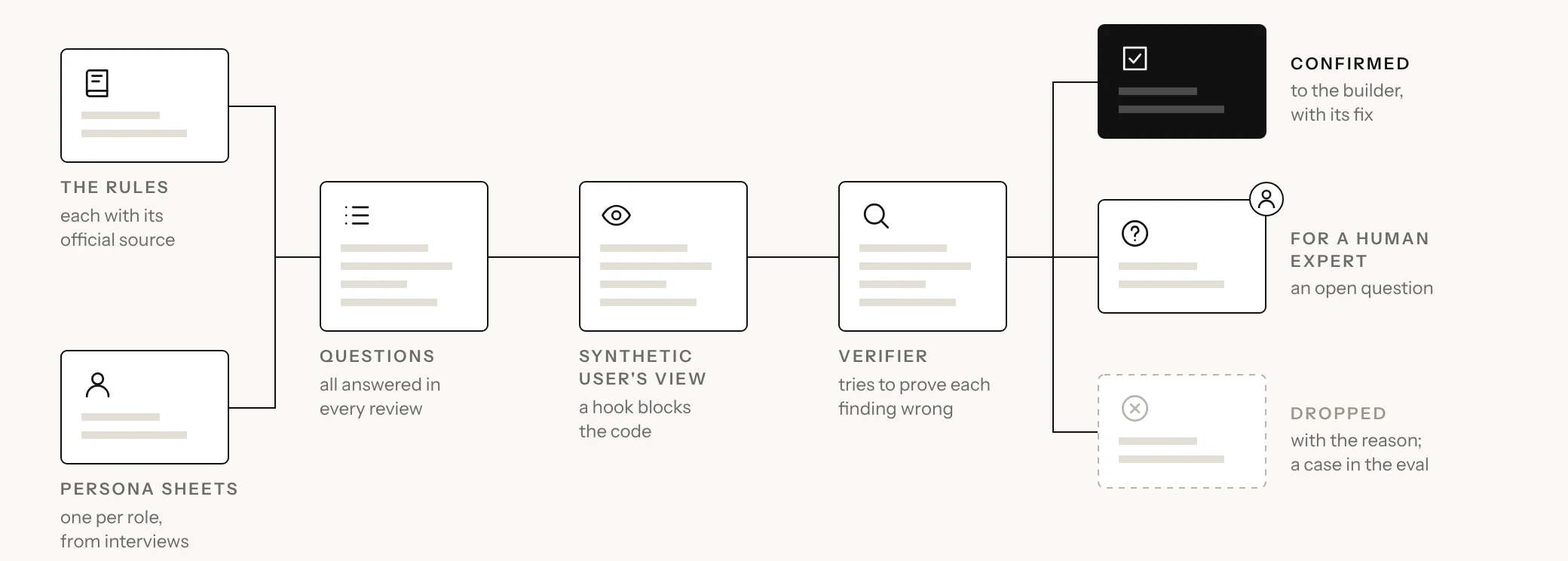
- The rules and the persona sheets
- Questions
- Synthetic user's view
- Verifier
- Where each finding goes
01
Why a synthetic user
In a regulated product, a wrong rule costs more than a bad screen. It can mean a missed legal deadline, a fee charged at an old rate, or a form that asks for less than the regulator requires. The people who build the product are rarely experts in these rules, and the experts cannot review every feature.
I ran into this building Mesa Jurídica, a product for in-house legal teams, alone and without being a lawyer. Chapter 12 shows how I applied the framework there.
The synthetic user reviews a feature, a screen or a public text as a user would, and says whether it is right. It works from two sources:
- The written rules, which say what is correct. The agent checks each feature against them and cites the rule. This is where the agent helps most.
- Interviews with real users, which say what they need and what they fear. The agent cannot find new needs, but it can check each feature against the ones users described.
The experts then answer only the few questions the agent could not settle.
To keep both current, an agent watches the official texts for changes, and each new interview adds to what the agent knows about users.
Every file and prompt is in a public kit you can copy into your own project: grounded-synthetic-user.
02
The rules, with their sources
The rules your users work under, such as laws, the regulator's norms and official deadlines, go into a knowledge base. It is a set of pages, one per topic, that the agent reads before it answers. Each rule has these parts:
| Part | What it holds |
|---|---|
| ID | A short code that stays the same when the wording changes, such as DEADLINES-04. Everything that uses the rule cites it. |
| The rule | One rule, in plain words |
| Source | The official text it comes from, with its address |
| Applies | The jurisdiction, the date the rule takes effect and, once it is replaced, the date it ends |
| Checked on | When a person read the official text, and who |
| Mark | Checked, or to confirm |
| Check again on | The date it must be read again, such as when a yearly cap is revised |
The knowledge base is not a copy of the law. It holds only the rules your product depends on, and the official text stays the source of truth. When a rule is missing, the agent reads the official text and adds the rule, marked “to confirm”. Only a person marks a rule “checked”. A source the agent cannot open, such as one behind a login, stays a gap until a person reads it.
Without a knowledge base, a model answers with what sounds like an expert. With one, the agent checks what an expert would check and cites the source of each rule.
An agent drafts the knowledge base from the product's PRD and the official texts you give it, in any regulated field, such as health, finance or labour law. Its prompt is in the public kit.
03
Keeping the rules current
Rules change, so a feature that was right when it was built can be wrong today without anyone touching it. Keeping the knowledge base current takes three parts:
- Watch the sources: an agent, the rules watch, reads the official sources on a schedule, such as once a week. A rule whose source changed, or whose “check again on” date has passed, goes back to “to confirm”.
- Keep each version: a changed rule is not overwritten. The old version gets an end date and stays, because work that started before the change may still follow it.
- Find what each change affects: every review lists the rules it checked by ID and version, such as DEADLINES-04 in force from 2026-01-01. A search for the ID finds every feature, screen and text to review again.
In all three, the agent proposes and a person decides. Where a source publishes data a program can read, the agent reads that instead of the web page. In Brazil, for example, the Diário Oficial da União publishes XML files, and LexML, the Senate's portal of laws, answers searches in XML.
04
Persona sheets from interviews
The second source is what users said in interviews. A regulated flow usually passes through several people: someone asks, an expert decides, a manager follows up, a board reads the report. So write one persona sheet per role, with that role's traits, such as their day, what they fear and how they judge a screen. Each trait notes its source, the quote or note it came from. Its strength is how many interviews say it.
Each business decides how many interviews make a trait strong. A trait heard second-hand or taken from desk research is weak. What nobody said is written as a hypothesis, and the agent cannot speak for users on it. A finding that rests only on weak traits is marked low evidence, and it becomes a question for the next interview, not a fix. With few interviews, even the strongest trait is a lead to test, not a fact. When two interviews disagree, keep both, because they may show two kinds of user.
In a review, each role runs as a separate agent that sees only its part of the flow. The most useful findings tend to be at the handoffs between roles: one role sends something incomplete, or two roles see different numbers. A role with no interviews can still run, as low evidence.
05
The questions every review answers
The questions are the core of the framework. Asked what it thinks, a model gives an opinion. Asked a specific question, it gives a yes or a no and a reason that can be checked. Some questions come from the rules and are asked as an expert, such as whether a feature is correct under each rule. Others come from the interviews and are asked as a user, such as whether the user sees what is due first.
Every review answers every question. A question that does not fit is marked “does not apply”, with the reason, so none is skipped in silence.
An agent drafts the questions from the knowledge base and the persona sheets, and a person edits the draft before the first review. Its prompt is in the public kit.
06
The synthetic user's view
The agent reviews the product as a user meets it, through its screens, texts and downloaded files, and never reads the code. A reviewer who knows how a screen was built tends to explain it instead of judging it. The agent works in two modes:
- Spec review: before a feature is built, the agent reads its spec or flow as each role would meet it.
- Product walk: once the feature is built, the agent walks a demo copy of the product in a browser, as one role.
The demo copy holds made-up cases in the real format, one for each situation the rules allow, so real user data never reaches the agent.
An instruction is not enough to keep the agent out of the code, but a hook is. A hook is a small script that runs before each action the agent takes and refuses any path that is not on the allowed list. Give the agent no command line unless it needs one, because a hook cannot reliably read the paths inside a command, and test the hook in a real run. In the public kit's first full run, the hook did not load in a session started from a script, and the agent read the code until the hook moved to the project's settings.
07
One review, file by file
The synthetic user is a set of files. One of them, the skill, holds the instructions. For each review, it takes the agent through five steps:
- Open the map, a table with one row per kind of work, such as a deadline feature or a help article. Each row names the knowledge base pages to open, the product decisions to respect, the roles to run and the questions that matter most.
- Open the knowledge base pages the row names, and add any missing rule, marked “to confirm”.
- Open the persona sheet of each role the row names.
- Fill in the report template, one row per question, so none is skipped. Each finding cites a rule ID, or a trait and its strength. Below the questions, the report lists every rule on the pages it opened, by ID and version, so a later change to a rule finds this review.
- Run the self-check: no question or rule is missing, and every rule ID and trait cited exists. A script can run most of these checks.
Each file changes for one reason. A new interview changes a persona sheet, a new or changed law changes the knowledge base, and a new kind of work adds a row to the map. The skill and the report template change only when the framework does. The files in the repository:
skill/                  the synthetic user
  SKILL.md              the framework, and its limits
  map.md                each kind of work: pages, decisions, roles, questions
  persona-sheets/       one sheet per role
    README.md           the sources, how a sheet is built
    legal-manager.md    traits, with strength and source
    lawyer.md           traits, with strength and source
    board.md            low evidence
    requester.md        low evidence
  report-template.md    one row per question, then every rule checked
knowledge-base/         one page per topic, each rule with its ID and source
eval/                   test cases, out of the synthetic user's reach
agents/
  synthetic-user.md     reviews a spec, or walks the app as one role
  verifier.md           tries to prove each finding wrong
  rules-watch.md        reads the official sources for changes
hooks/
  black-box.mjs         allows the spec and the base, refuses the code
When it runs
It runs when someone asks for it, during design and before publishing. A rule that decides a deadline, a date or a value gets a spec review before a screen is drawn, and a public text that states a rule is reviewed before it goes out. It does not block pull requests, because most of its work happens before there is code.
What it may not do
It must not invent a law, an article or a value, or overrule a product decision without saying so. It contacts no one, writes only its report and rules marked “to confirm”, and changes nothing in the product.
08
The verifier
Before a finding reaches the human in the loop, a second agent, the verifier, tries to prove it wrong. It starts fresh, with the same sources and never the code, and runs on a different model, so the two are less likely to make the same mistake. Research calls this investigator triangulation: a finding counts only when a second investigator reaches it again.
For each finding, the verifier reopens the rule or the trait, redoes any count, repeats in the demo copy any step the finding rests on, and checks whether a product decision chose that behaviour on purpose. When several roles ran, it also compares their reports at each handoff. Each finding then goes to one of three places:
- Confirmed: to whoever built the feature, who makes the fix.
- For a human expert: to the list of questions for one, with every finding that rests on a rule still “to confirm”.
- Dropped: to a separate list, with the reason.
A low-evidence finding keeps its mark wherever it goes. The verifier tests only the findings it is given; finding what the synthetic user missed is the eval's job.
09
The eval
The eval checks that the synthetic user still catches what it should after someone edits one of its files. It is a list of test cases the synthetic user never reads, so it cannot learn the answers. Each case gives it something to review and says what a good reviewer does, citing the rule IDs. For example, a help text states a yearly cap with no date and no source. A good reviewer flags that the text must say which value is in force and where it comes from.
Most cases are past errors the agent must flag. Some are choices made on purpose that it must not flag, so an agent that flags everything fails. Every error it missed and every finding the verifier dropped becomes a new case.
Another agent, on a different model, grades each answer. Each case runs several times, because a model's answer varies from run to run, and the eval passes only when every case passes. It is a regression test: it shows the synthetic user still catches known errors, not that it catches every error.
10
How to start
Start small, with one knowledge base page, one role and a spec review of one feature, then add the rest:
- Have an agent draft the knowledge base, and a person check each rule.
- Set the rules watch to read the official sources on a schedule.
- Interview real users before you write a persona sheet.
- Have an agent draft the questions, and edit them before the first review.
- Write down the choices you made on purpose, one file per feature.
- Build a demo copy with made-up cases, and block the code with a hook.
- Add the verifier, and turn what it drops into eval cases.
What each business sets
A few choices change from one business to the next. The rest is the framework and stays the same.
| Part | What each business sets | What stays the same |
|---|---|---|
| Evidence | How many interviews a trait needs to be strong | Anything weaker is marked low evidence, never dropped |
| Official sources | Which sources the agent may open | Every rule cites its official text |
| Rules watch | How often the sources are read, and how long a checked rule lasts before it is read again | A changed rule goes back to “to confirm”, and everything reviewed against it is reviewed again |
| Roles | Which roles run | A role without interviews runs as low evidence |
| Human expert | Who answers the open questions | No finding reaches a person before the verifier |
| Eval | The cases, and how many times each one runs | The synthetic user never reads the cases; every case passes before the next review |
11
What this does not cover
Synthetic users do not replace real ones, least of all for product strategy. They cannot tell you what to build. The synthetic user is not professional advice either. It checks against the rules and flags what needs a human expert. It also does not cover:
- How a rule is applied in practice. It checks the rule as written in the knowledge base, not how a court or a regulator applies it.
- Usability. The user questions check each feature against what people said they need, not whether they can use it.
- Situations nobody thought of. The demo copy holds only the cases its authors wrote.
- A wrong rule. A rule marked “checked” by mistake reaches every review that uses it, so the person who checks the rules matters most.
12
Applying it on Mesa
The framework came from building Mesa Jurídica, where every day brought a new deadline rule, screen or site text to check against the law.
On Mesa, the synthetic user reviews as a lawyer: flows before they are built, texts before they are published, and the app as each role. Its knowledge base covers Brazilian labour law, procedural deadlines and court rules. Its persona sheets come from interviews with an in-house lawyer, a legal management team and a contracts lawyer. The interviews made it work. Not being a lawyer, I could not judge a review by how it sounded, but I could check that each claim traced back to a rule or to something a lawyer said.
The verifier checked 18 findings: 12 confirmed, 2 sent to a human lawyer, and 4 dropped, each because it flagged a choice I had already made. Of 6 articles reviewed before publishing, 5 needed changes, and every change was applied. The rules watch is not built on Mesa yet.
Next case
03 / 08AI platform · 2023 to 2026